03. Imprest Account
What is Imprest
An Imprest is a deemed cash account which allows us to pay advances to employees for incurring routine or small expenses and any kind of tour advances etc. The same account is settled after receiving bills/statement of accounts from employees.
An imprest account is used for handling minor disbursements whereby a fixed amount of money is set aside for this purpose. Disbursements are made as needed with a receipt or petty cash voucher being completed in each case.
The imprest system is a form of financial accounting. The most common is petty cash. The basic characteristic of an imprest system is that a fixed amount is reserved, which after a certain period of time or when circumstances require, because money was spent, will be replenished.
Treatment of Imprest Accounting in Farvision –
In Farvision treatment of Imprest Accounting is to be followed as per following steps:
Ledger Creation
Advance Generation
Expense Invoice Booking (Optional)
Settlement of Imprest Account
Ledger Creation
Each and every Employee ledger is created from Employee Master under Payroll Module.
Automatically employee ledger will be created under “Salary Payable” after saving of Employee.
For Employee Creation please follow - Payroll > Employee > Employee Master
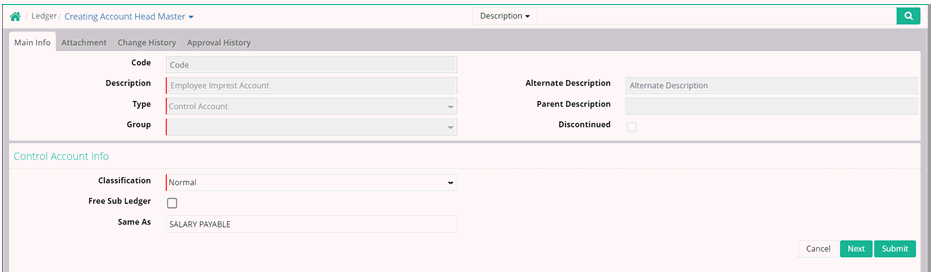
Now we need a Control Account which allow us to access all the employees created under Employee Master.
This Ledger we have to create from Finance Module and same has to be Control Account with classification as “Normal” and Same As has to be “Salary Payable”
The Same As allow us to use same Employee Ledger created from Payroll Module and this will minimal the configuration time of creation Employee wise Imprest Account.
To understand concept of Control Account, Please follow Account Head Master
Please Place the Ledger under Assets > Current Assets > Cash and Cash Equivalents > Cash
For Chart of Accounts Grouping, please follow Business Process and Scenario
Advance generation
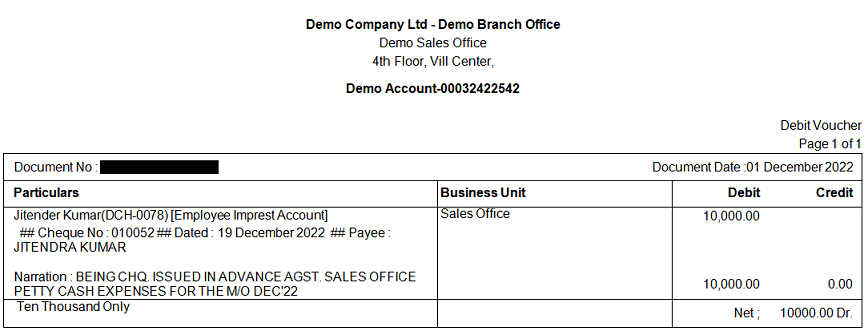
Please use Receipt/Payment from Finance to give Imprest:
Advance can be given from same Business Unit or different Business Unit depending on the policy and Business Scenario of the Company.
A sample advance payment voucher will be displayed as below:

Expense Invoice Booking
Employees user to submit Actual Invoice/Statement of Account to cashier after a certain period and same will be booked in Farvision as below:
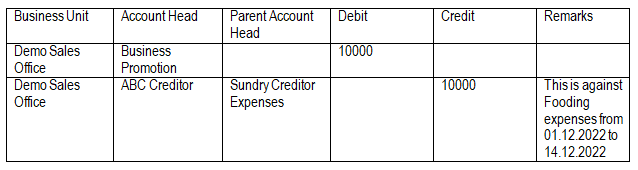
Booking of Non Store Purchase Bill/Purchase Bill where received actual Invoice from Vendor and submitted by Employees
Assuming No TDS and GST is applicable in Bill
The below entries will be passed against Bill Booking through Non Store or Purchase Bill.
Please refer Non Store Purchase Bill Booking.
Please refer Purchase Bill Booking.
Note: This is required when we have received physical invoice from Creditors and employees submitted the same against Tour advances.
Settlement of Imprest Account
After actual Bill booking we have to settle the Imprest Account through Journal Voucher which is as below:
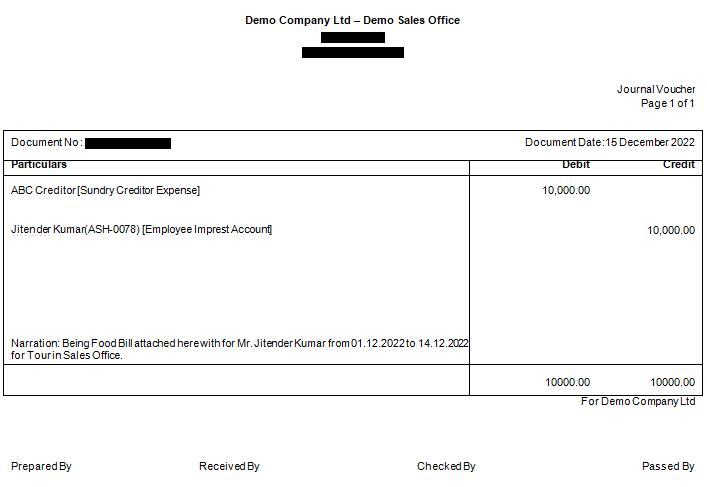
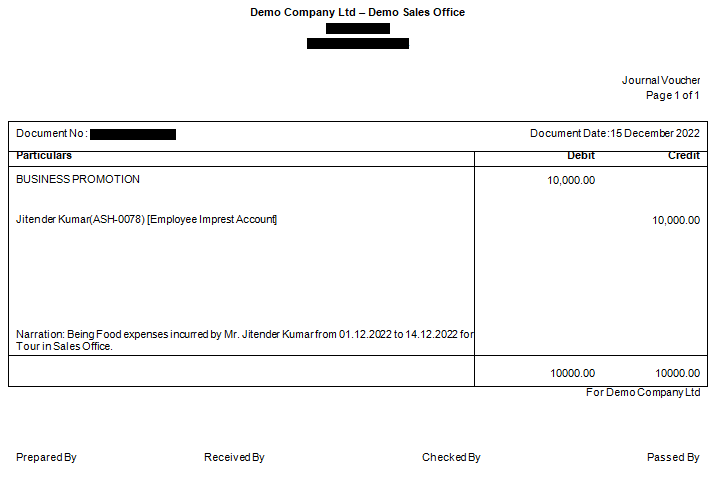
Settlement of Imprest Account through Journal Voucher if no Creditor Bill is submitted by Employee.
Please use the following JV to settle the Imprest Account.
Treatment of Imprest for other than Employees
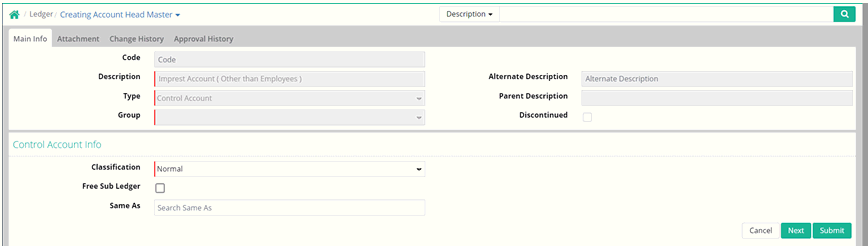
Please create another Control Account named “Imprest Account (Other than Employees)”
Notes:
1. Don’t use Same As option in this case as the he/she is not employee and create respective sub ledger under “Imprest Account (Other than Employees)”.
2. Grouping under Chart of Accounts will be Assets > Current Assets > Cash and Cash Equivalents > Cash
3. Rest of the process will be same as above.
© Gamut Infosystems Limited