 Tutorial: Creating Qualification Details
Tutorial: Creating Qualification Details
Tutorial: Creating Qualification DetailsEmployee qualification details are to be recorded here.
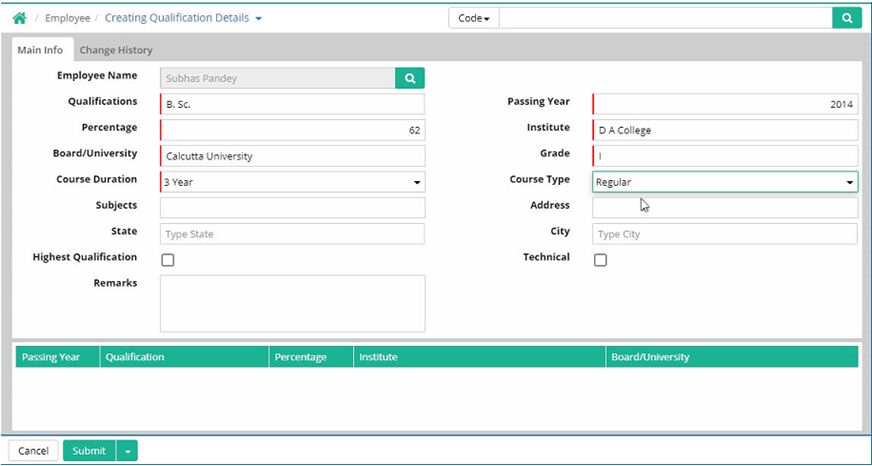
Employee Name: Select an Employee whose qualification details are to be recorded (Defined through Transaction > Employee > Employee Master)
Qualifications: Select the qualification of the employee (Defined through Setup > Basic Masters > Qualification Master)
Passing Year: Enter the year of passing
Percentage: Enter the percentage of number obtained by the employee
Institute: Enter the name of the institute the employee studied from
Board/University: Enter the name of the board or university the employee passed from
Grade: Enter the grade the employee achieved
Course Duration: Select the duration of the course in year
Course Type: Select the course type regular or correspondence as applicable
Subjects: Subjects can be mentioned
Address: Address can be mentioned here
State: Name of the state can be specified
City: Name of the city can be specified
Highest Qualification: Select this if the qualification mentioned is the highest
Technical: Select this if the qualification mentioned is technical
Remarks: Any comments can be entered here
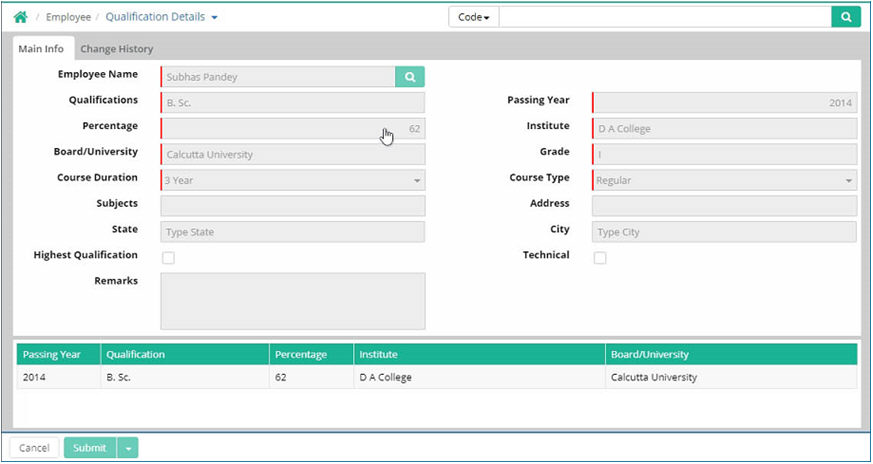 Tutorial: Creating Qualification Details
© Gamut Infosystems Limited