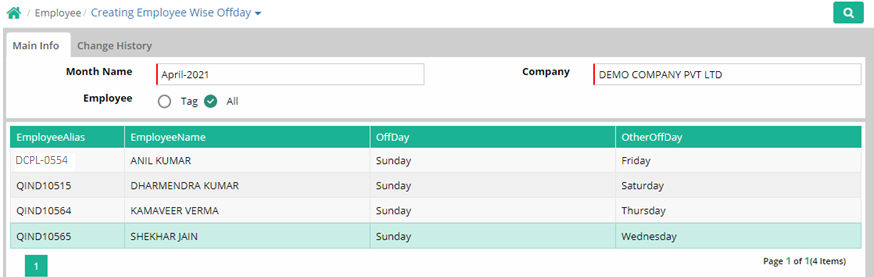
Employee wise Off day
Generally an organisation has Weekly and Other Off Days defined as per their Office Policy. Weekly and other off days are defined through Office Master at seating office level. Employee wise off days which can be defined here. Different combinations as indicated in the examples can be created for all or selective employees. Off Days automatically determine your availability for shifts. Attendance will also reflect employee wise Off Days defined.
Employee |
Weekly Off day |
Other Off day |
Remarks |
||||
1 |
2 |
3 |
4 |
5 |
|||
Employee A |
Sun |
Sat |
|
Sat |
|
|
Every Sunday and 1+3 Saturday off |
Sun |
|
Sat |
|
Sat |
|
Every Sunday and 2+4 Saturday off |
|
Employee C |
Sun |
Fri |
|
|
Fri |
|
Every Sunday and 1+4 Friday off |
Employee D |
Mon |
|
|
|
|
|
Only every Monday off |
Employee E |
Sun,Sat |
|
|
|
|
|
Every Saturday & Sunday off |
Month Name: Select Month from which the employee wise offday entry is to be effective.
Company: Select Company to which company employee belongs.
Employee: Click on ‘All’ the employees if the same policy is to be defined for all employees of the selected company. Else choose the employee(s) for whom tagging of Weekly and Other Off Day has to be done.
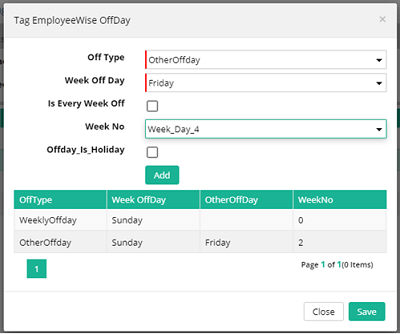
Click on Add New Row button to create one row for each Off Day for an office. To add another off day, add another row. For Employees whose off days are not specifically defined, Off Days as defined in the Office Master will be applicable.
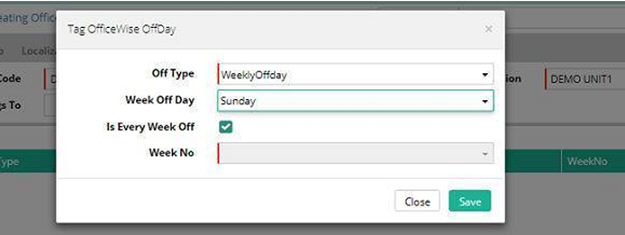
Off Type: Select off day type - Weekly Offday or Other. If a fixed day of every week is off, choose Weekly Offday. This will go hand in hand with Is Every Week Off. Is Every Week Off should be checked marked in case of Weekly off day. If the off day is not applicable for all weeks, choose Other off type, and keep the Is Every Week Off field unchecked.
Week Offday: Select the weekly offday from the drop down list.
Is Every Week Off: Tick this box if the offday will be observed for all weeks of the month. After saving “week 0” will be updated for every week off.
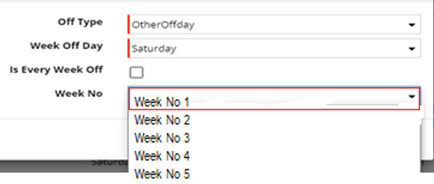
Week No: Select week number on which the Other off day will be applicable. Example, if Saturday is the second/other off day every second Saturday, then choose Week 2 here. If it is Saturday is off every 1st, 3rd and 5th Saturday of the month, add three rows choosing the Week1, Week3, Week5 separately. This is required only if 'Is Every Week Off' is not checked.
Reports
Employee wise off day assigned can be seen from Off day register
Emp Alias |
Emp Name |
OffDay |
OtherOffDay |
X0001 |
Ashok K |
Sunday |
Saturday |
X0002 |
Williams PS |
Sunday |
|
X0003 |
John |
Friday |
Saturday |
© Gamut Infosystems Limited