
| User | |
This interface is used to create new login user.
Steps to use User
Navigation to User:
Administration > Transaction > Security > User
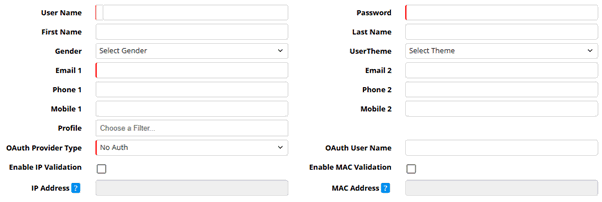
User Name: Enter user name (Mandatory)
Password: Enter password (Mandatory)
First name: Enter first name of the login user (Mandatory)
Last Name: Enter last name of the login user (Mandatory)
Gender: Select gender
Email1: Enter email address of the login user (Mandatory)
‘Email 2’, 'Phone 1', 'Phone 2', 'Mobile 1' and 'Mobile 2' are optional fields.
Profile: User profile can be selected (Administration > Security > Profile Master)
User Theme: User theme can be selected as per choice
Discontinued User: To discontinue an active user this option has to be selected. If user wants to make a discontinued user as active again then this option has to be deselected.
OAuth Provider Type: Choose the preferred Provider Type from the drop-down list.
OAuth User Name: Enter the User Name of the person concerned.
Enable IP Validation: When selected, the User’s IP address is also verified during login, which should match the IP address mentioned under the field IP Address.
IP Address: This field is enabled only when Enable IP Address is checked. The admin must enter the login IP. If a different IP address is used, login is blocked.
Enable MAC Validation: When selected, the user's MAC address is also verified during login, which should match the MAC address already mentioned under the field MAC Address.
IP Address: This field is enabled only when Enable MAC Address is checked. The admin must enter the login MAC. If a different MAC address is used, login is blocked.
© Gamut Infosystems Limited