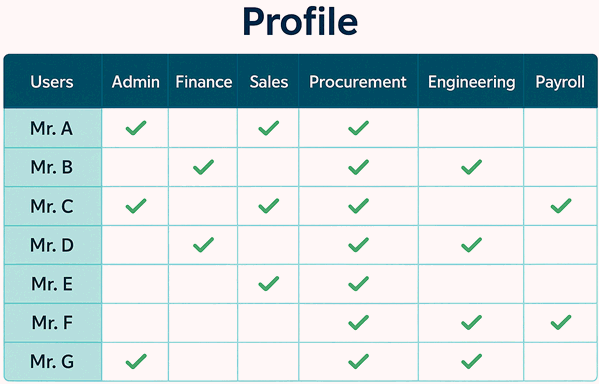
| Profile |
A job profile is to be created based on job responsibilities and work functions
within one department or within multiple departments. Multiple profiles
can be assigned to a single user.
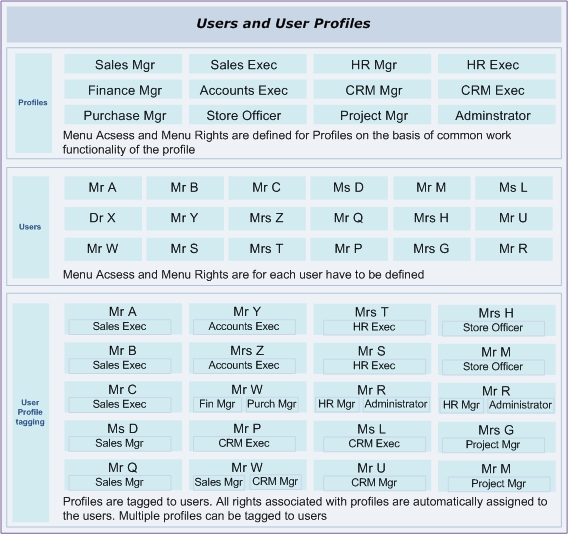
Steps to use Profile
Navigation to Profile:
Administration > Transaction > Security > Profile
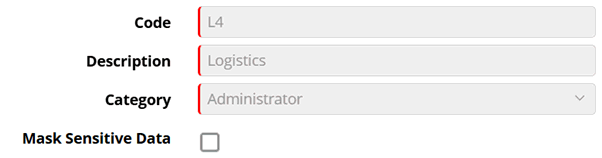
Code: : Enter short name of the job profile like CFO for Chief Financial Officer and COO for Chief Operating Officer.
Description: Enter description of the job profile like Chief Financial Officer, Chief Operating Officer etc.
Category: Select the category from the drop down list. Data comes from Setup > Enterprise Hierarchy > Category Master
Mask Sensitive Data: Mark profiles with sensitive data like Aadhar or bank details as encrypted in UI reports including sensitive data that should not be made public.
© Gamut Infosystems Limited