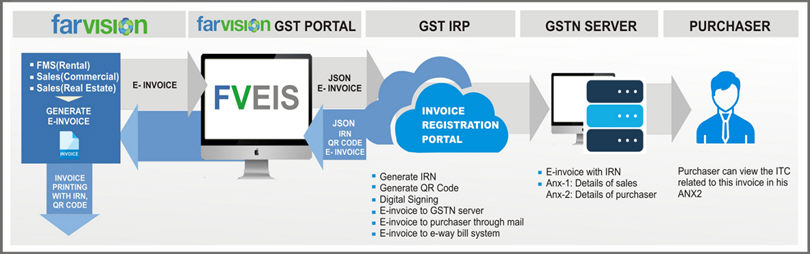
Farvision E-Invoice System Process Flow
Farvision E-Invoice System (FVEIS) provides end-to-end solution for E-Invoice to FV-GST Portal users:
Business house will generate invoice as per their business needs and standards. On saving of the invoice or after approval, Invoices are kept in a queue to be sent for processing GSTN- Invoice Registration Portal (IRP). The sending of the invoices is as per an internal backend scheduler of Farvision, which runs every 15 minutes, or as configured by us. FVEIS will upload multiple invoices in bulk and will expose to IRP one by one for each invoice.
FVEIS will convert these invoice data into prescribed e-invoice data formats and will be available after a few minutes (as per scheduler timing). It will also provide facility to download the IRN and QR Code from IRP to equip the business house to print its standard invoice with QR code User has to take print out of the invoices as he normally does
In Farvision r2, a console has been provided which will display status of e-invoice. Successful, failed (with reason), re-try and print. E-Invoices which are successful can be printed from this console or through advanced search or entry interface.
The flow of data is shown in the diagram:
Invoice Registration Number (IRN)
Parameters which will be used to generate IRN (hash)are:
a. Supplier GSTIN
b. Supplier’s invoice number
c. Financial year (YYYY-YY)
QR Code
The QR code will consist of the following e-invoice parameters:
a. GSTIN of supplier
b. GSTIN of Recipient
c. Invoice number as given by Supplier
d. Date of generation of invoice
e. Invoice value (taxable value and gross tax)
f. Number of line items.
g. HSN Code of main item (the line item having highest taxable value)
h. Unique Invoice Reference Number (IRN)
Following Farvision modules will have the impact of e-Invoice:
a. Facility Management (Rental)
b. Sales (Real Estate)
c. Sales (Commercial)
d. Construction (RA Bill to Customer)
Documents presently covered under B2B e-invoicing:
a: Invoice
b: Debit Note
c: Credit Note
a. Registration in govt e-invoice portal for user login credentials.
b. Check whether your GSTN is e-invoice is auto-enabled. If not, then manually enable it.
c. Enable API in Govt e-invoice portal. Share username and password with Farvision team so that Farvision API can communicate with the govt e-invoice portal.
d. Invoice generation of the organization would be as per ERP transaction forms of the respective modules.
e. Once Invoice gets generated Farvision E-Invoice System (FVEIS) will capture all relevant data for GST e-Invoice.
f. FVEIS will upload these data invoice wise for E-Invoice to GST – IRP.
g. GST-IRP will generate E-Invoice. Corresponding IRN and QR-Code for each invoice will be generated.
h. FVEIS will capture IRN and QR code from GST-IRP and will store those into FV database against each Standard Invoice of the organization.
i. The Invoice of the organization will now contain IRN and QR code. This invoice can now be printed from Farvision.
j. Checking QR Code of the invoice
o Scan the QR code of the printed e-invoice by downloading mobile app.
o Download QR Code Verification App Through E-invoicing portal > help > tools > verify QR code App.
o After OTP verification you will get a link to download required App for mobile.
o Download and install the App for further scan/verifications.
© Gamut Infosystems Limited